Displaying Multiple Access Records with Flash and ASP
Most Flash & ASP tutorials only deal with returning one row of information at a time from the database to the Flash movie. I was interested in displaying multiple records and fields simultaneously. One resource (FlashCFM.com) pointed the way and I used this start to arrive at a nice solution which is explained here.
The Flash side of things
Now, we have
our output formatted so Flash can read it. Set up a Flash movie as so:
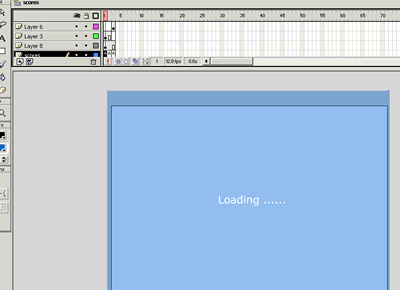
- Frame 1 Layer
1 - add a keyframe and the following action : loadVariablesNum
("list2.asp", 0);
list2.asp is our ASP page that we have formatted to work with Flash - Frame 1 add
the text Loading ... on Layer 2. This will display
until all the records are looped through by the ASP page and
the variable 'counter' is set to 1. - On Frame 2 add
the following action :
if (_root.Counter == 1) {
gotoAndStop (3);
} else {
gotoAndPlay (1);
}
'Counter' is a variable we set up on the ASP page to signal the Flash movie that all of the table data has been read - Create a new movie clip that looks like an up arrow - copy it, rotate it 180 degrees and place both of these button into another movie clip - name it arrow. You will use these later to scroll your results.
- Frame 2 add
the following code to the frame :
if (_root.Counter == 1) {
gotoAndStop (3);
} else {
gotoAndPlay (1);
}
This insures that Loading will be displayed as the results are being returned. - Frame 3 - this
is where flash reads the array created by ASP, splits the array at the ","
and duplicates the dynamic
text fields. A lot of work but just follow the screen shot.
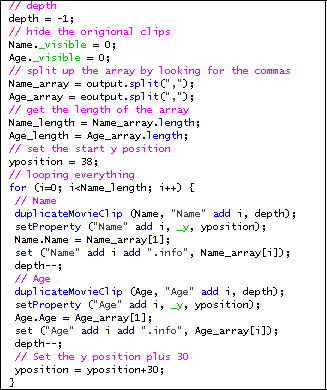
- Now double click
on the movie clip containing the buttons and select one of the arrows. To
the arrow button attach the following code:
on (release, keyPress "<Up>") {
for (eachBox in _root) {
_root[eachBox]._y -= 10;
setProperty (_root.arrow, _y, ypos);
}
}
This uses the 'for...in' method to find each movie clip on the _root and move it down after each button press or each press of the down arrow key. Problem, this also moves your navigation buttons as they too reside in a movie clip on the _root. Fix this by adding a second layer to the inner movie clip and attaching the following code to the first layer
on that frame:
var ypos= _root.arrow._y;
Now if you look back to the code in step 7 you see that after you change the _y position of all the clips on the _root, you change the arrow movie clip back to its original _y
That's it! Download Fla
Written by Chris
Bizzel
The Pinnacle Consulting Group
This tutorial was
the result of cobbling together information from several different resources
and I want to thank David Freerksen particularly for sharing his code on the
duplication of movie clips.
If you have questions about this tutorial contact me at webmaster@pincongrp.com.

Comments
Appreciatable effort !!!
I just wanted to thank you so much, as I've been through so much to find out the way in which I can do such things...as I'm kinda fluent in Flash 5 and ASP.NET, and wanted to get a way between them to get working together..especially with databases...
Thank you very much once again...
P.S. I know that you were talking about ASP, but ASP.NET won't differ a lot, it's all the same concept...
ASaP
Along these same lines, if anyone is interested, there's an excellent ASP generating wizard (shareware app) at:
www.data-asap.com
Free if you just need to display data and only $29 if you need your visitors to be able to add/remove/modify records!!
Tutorial Update
Display Images too ?
That's great and seems easy, but what about displaying images?
Or even, how can I do a 'mailto' for each name.
Thanks
You must me logged in to write a comment.